12 copy-paste prompts, a tool comparison, and the prompt formula professional AI artists use — built for GPT Image 2 in 2026.
Most people type one sentence and wonder why their AI portrait looks fake.
“A realistic portrait of a woman in soft light” — and what comes back is technically generated but somehow hollow. Smooth but lifeless. A face with no story behind it.
The frustrating part: the model is capable of far more can produce portraits that look like they came out of a professional studio session. Accurate skin texture. Natural catchlights in the eyes. Light that sculpts a face rather than just brightening it.
But those results require prompts built on a real framework — not guesswork.
Why AI Portrait Generation Is Uniquely Difficult
Portraits are the hardest category of AI image generation — not because the tools are weak, but because human perception of faces is extraordinarily precise.
We’ve spent our entire lives reading faces for emotion, trust, and intention. The moment something is subtly wrong — misaligned eyes, skin that’s too smooth, light that doesn’t cast a shadow under the nose — our brains flag it immediately. This reaction is called the uncanny valley effect, and overcoming it is the central challenge of realistic AI portrait prompts.
What causes the uncanny valley in AI-generated portraits? Almost always one of these five things:
Flat, directionless lighting. Without shadow, a face loses all three-dimensionality. Real faces have shadow under the cheekbones, beneath the nose, and along the jaw. Without that, the portrait looks printed rather than photographed.
Over-smoothed skin. AI models, left without direction, eliminate pores, fine lines, and texture variation. The result is the classic “wax figure” effect that immediately signals an AI-generated image.
Missing lens perspective. An 85mm portrait lens looks fundamentally different from a 24mm wide-angle. Without specifying a focal length, the model defaults to an ambiguous perspective that rarely matches professional photography.
Adjective overload. Stacking “beautiful, stunning, gorgeous, amazing” gives the model zero visual information. These are evaluations, not descriptions — the model averages them into something generic.
Style conflicts. “Realistic anime portrait” or “photographic illustration” give contradictory direction. The output compromises both styles and achieves neither.
Understanding these five failure modes tells you exactly what your ChatGPT portrait prompts need to prevent them — and that understanding is the foundation of the framework below.
The Five-Layer Portrait Prompt Framework
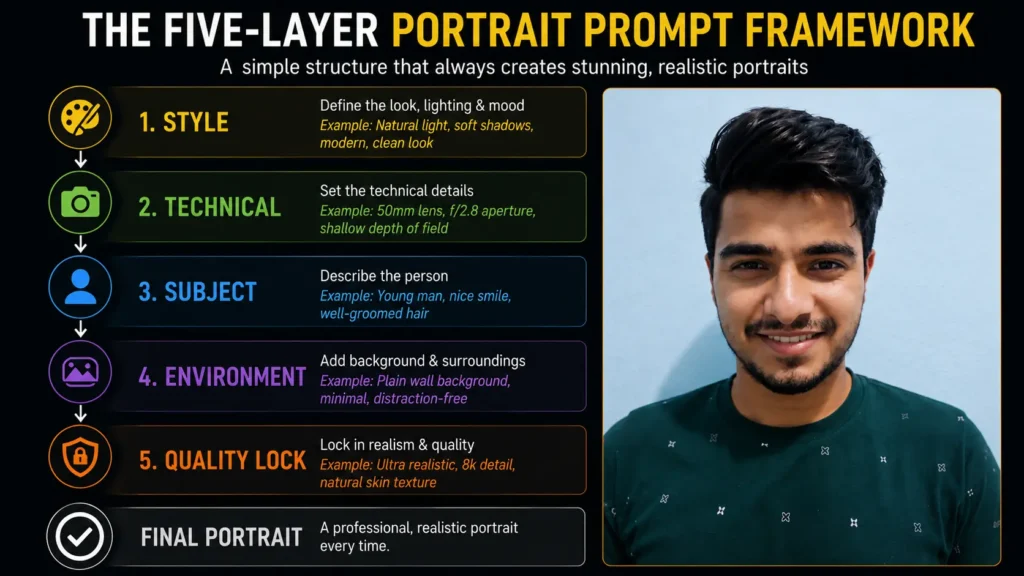
Every effective ChatGPT image prompt for realistic portraits operates on five layers. Think of it as a professional photographer’s mental checklist before pressing the shutter. You don’t always need all five at maximum detail, but you need to know which layers matter most for the result you want.
Layer 1 — Style Anchor
The style anchor is the first thing the model reads, and it sets the entire output universe. “Photorealistic editorial portrait” produces a completely different image than “cinematic portrait film still” — even with identical subject descriptions.
Your style anchor needs to be specific about the visual language: photography or render? Editorial, documentary, fashion, or commercial? Analog (film grain, warm tones) or digital (crisp, high-contrast)?
Strong style anchors for realistic AI portraits:
photorealistic editorial portraitcinematic portrait photographyanalog film portraitfine art documentary photographysoft beauty editorial
Weak style anchors to avoid:
realisticprofessionalhigh qualitybeautiful
Layer 2 — Technical Specifications
This is where most ChatGPT portrait prompts collapse, and where professionals over-specify. Camera and lens terms carry implied visual information the model genuinely understands and responds to.
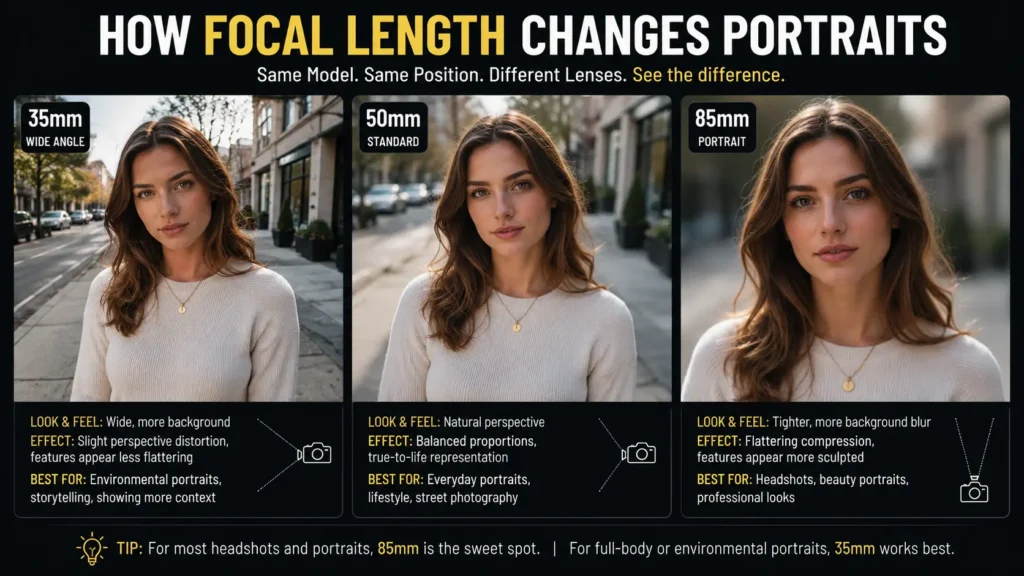
“85mm lens” signals classic portrait focal compression and the flattering perspective of professional portrait photography. “f/1.4” implies shallow depth of field and soft background separation. “ISO 800, slight grain” implies a look that feels like a real low-light photograph.
Key technical parameters for portrait prompts:
- Focal length: 50mm (natural perspective), 85mm (classic portrait compression), 35mm (environmental, wider context)
- Aperture: f/1.4–f/2 for dreamy bokeh, f/5.6 for sharp environmental context
- Lighting setup: key light position, fill light presence, rim light
- Film stock (for analog looks): Portra 400, Kodak Gold 200, Cinestill 800T — these named stocks trigger specific tonal associations the model recognizes
Layer 3 — Subject and Mood
One sentence describing who is in the frame, their expression, and the emotional quality you want.
The key insight: emotional words consistently outperform physical superlatives. “Quietly confident” is more useful than “beautiful.” “Weathered and contemplative” gives the model more to work with than “interesting face.” Describing the emotion you want the viewer to feel is often more effective than describing physical features directly.
Layer 4 — Environment and Context
Where is this person? Even a deliberately simple background needs to be stated — the environment does two jobs simultaneously: it tells a story about the subject, and it creates the lighting conditions.
Placing someone near a window tells the model to generate soft, directional natural light. A city street at night implies ambient artificial light and background bokeh. An open field at late afternoon implies warm, raking golden light. The environment and the lighting are connected — use that connection deliberately.
Layer 5 — Quality Lock and Negative Constraints
This layer prevents the most common failure modes. A brief quality statement and one negative constraint removes the default behaviors that make AI portraits feel artificial.
For standard generation: Add: “Realistic skin texture with visible pores, natural facial proportions, no over-smoothing.”
For photo edits with an uploaded reference image: Always add: “Keep my facial features exactly as they appear in the uploaded image — same eyes, nose, mouth, face shape, skin tone, and expression.”
GPT Image 2 note: One of the biggest upgrades in the April 2026 GPT Image 2 model is improved face-preserving reference lock. According to OpenAI’s own prompting guide, the model now holds identity more reliably across styling, lighting, and pose changes — but the identity lock phrase still significantly improves consistency. Always include it.
The Universal Prompt Formula (Copy and Save This)
Here is the formula that applies the Five-Layer Framework to any portrait scenario:
[Style anchor] portrait of [subject + one mood descriptor].
[Lighting: source, direction, quality, shadows].
[Lens: focal length, aperture, depth of field].
[Environment: one sentence on location and context].
[Skin / quality instruction: texture, realism, avoid over-smoothing].
[Optional negative: one specific failure mode to prevent].
Built example using the formula:
Photorealistic editorial portrait of a woman in her late 30s, quietly self-assured expression. Soft north-facing window light with gentle shadows under the cheekbones and along the jaw. 85mm lens, f/2, shallow depth of field. Seated at a café table, blurred warm interior behind her. Natural skin texture with fine pores visible, no smoothing. Avoid over-processed skin.
Five sentences. Full framework applied. Everything below is that formula at work across 12 real use cases.
Ready-to-Use ChatGPT Image Prompts for Realistic Portraits
These prompts are organized by use case, built on the Five-Layer Framework, and written to prevent the most common failure modes. Copy them as-is or adapt them using the formula above.
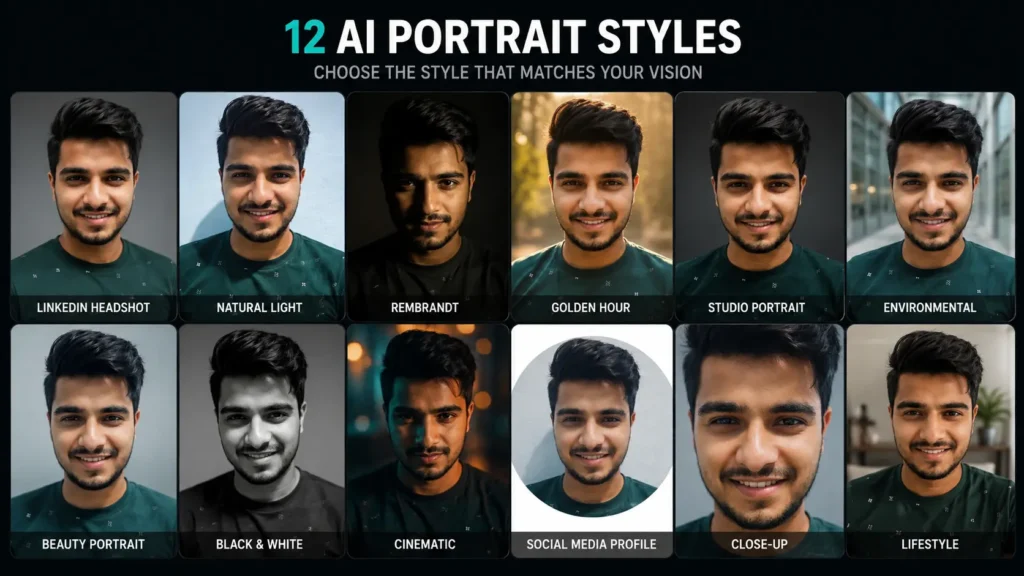
Prompt 1 — Professional LinkedIn Headshot
Best for: Personal branding, professional profiles, company about pages, speaker bios.
Photorealistic professional headshot, chest-up portrait of a person in their mid-30s,
natural confident smile, warm and approachable expression. Soft diffused studio lighting
with gentle catchlight in both eyes. 85mm portrait lens, f/4, sharp focus on the eyes.
Clean gradient grey background. Well-fitted navy blazer over a white shirt. Realistic
skin texture, natural depth. Not stiff or overly corporate — confident but personable.
Why it works: “Not stiff or overly corporate” pushes the model away from the frozen expression AI defaults to in “professional” contexts. Specifying background gradient and clothing colors removes randomness that would otherwise produce inconsistent results.
How to adapt: Change blazer color to match your brand palette. Replace “mid-30s” with your target age range. Add “natural makeup” or “minimal grooming” to guide styling.
Prompt 2 — Soft Natural Light Lifestyle Portrait
Best for: Lifestyle content, social profiles, personal portfolios, family portraits.
Photorealistic lifestyle portrait, warm and intimate. Woman in her late 20s seated near
a sunlit window, soft north-facing diffused light, gentle shadow wrapping around one
cheek. Slightly tilted head, peaceful and genuine expression — not posed. 50mm lens,
f/1.8, bokeh in background. Simple home interior behind her, warm tones, slightly
blurred. Natural skin with fine texture, no retouching, honest and real.
Why it works: “Not posed” and “honest and real” are emotional direction cues that push the output toward something that feels caught rather than constructed. The model’s default is posed and centered — these phrases counter that directly.
Prompt 3 — Rembrandt Lighting Dramatic Portrait
Best for: Fine art prints, editorial features, gallery-style AI art, dramatic character portraits.
Fine art photographic portrait with classical Rembrandt lighting. Man in his late 40s,
strong features, weathered skin, calm and introspective expression. Key light positioned
high and to the left, creating a small triangle of light on the right cheek, deep shadow
on the left side of the face. No fill light. Textured dark background, almost black.
85mm lens, f/2.8, tight head-and-shoulders framing. Grain present as in medium-format
film. Visible skin texture — pores, fine lines, character.
Why it works: Naming a lighting technique like “Rembrandt lighting” unlocks the model’s trained associations with that specific setup rather than requiring you to describe the effect from scratch. “No fill light” keeps the shadow side authentic and prevents the model from softening it.
Prompt 4 — Golden Hour Outdoor Portrait
Best for: Lifestyle campaigns, travel content, warm and aspirational imagery, seasonal content.
Photorealistic outdoor portrait, golden hour magic hour light. Young woman mid-movement,
hair caught in a light breeze, genuine laughing expression. Warm backlight rim from the
setting sun, creating a glowing halo around the hair and shoulders. Slight lens flare in
upper corner. 85mm lens, f/1.8, background beautifully blurred into warm orange and
amber bokeh. Open field or coastal setting. Skin glowing, warm undertones, natural and
unprocessed look. Kodak Portra 400 film aesthetic.
Why it works: Naming “Kodak Portra 400” rather than just “film look” triggers specific color associations — warm skin tones, slightly lifted blacks, gentle highlight roll-off — that would otherwise take several sentences to describe. Named film stocks are one of the most efficient tools in realistic portrait prompting.
Prompt 5 — Studio Fashion Editorial
Best for: Fashion content, beauty editorials, brand campaigns, creative portfolio work.
High-fashion editorial portrait photography. Woman in her early 20s, striking bone
structure, direct gaze into camera — intense but controlled. Large softbox to the left
at 45 degrees, subtle fill from a silver reflector right, clean catchlight. White studio
backdrop. 135mm equivalent lens, f/5.6, tack-sharp from eyes to shoulders. Skin: smooth
but with texture — editorial retouching, not beauty retouching. Magazine-quality.
Why it works: The distinction between “editorial retouching” and “beauty retouching” is one real photographers make constantly — editorial preserves character, beauty retouching eliminates it. Including that distinction guides the model toward results that feel credible rather than processed.
Prompt 6 — Environmental Portrait (Person in Their World)
Best for: Documentary storytelling, personal essays, character-rich editorial portraits.
Documentary-style environmental portrait. A craftsperson or artisan in their 50s working
in a small workshop, hands visible mid-task, expression focused and absorbed — genuinely
not performing for the camera. Available light coming through a side window, catching
dust particles in the air, warm and directional. Objects in the background tell the
story of the work — tools, materials, worn surfaces. 35mm lens, f/2.8, enough depth of
field to show context. Film grain present. No artificial posing, no eye contact
with camera.
Why it works: “Genuinely not performing for the camera” and “no artificial posing” guide the model away from the centered, symmetrical positions it defaults to. The most compelling environmental portraits feel observed, not staged.
Prompt 7 — High-Key Beauty Portrait
Best for: Skincare and beauty brands, clean lifestyle imagery, soft commercial content.
High-key beauty portrait, clean and luminous. Woman in her 30s with soft, glowing skin,
serene and open expression. Overcast-light setup with large soft sources above and to
both sides — no harsh shadows, very subtle dimension. Pure white background with slight
vignette to the edges. 85mm macro lens, f/5.6, extremely sharp focus on eyes and skin.
Skin: luminous and healthy but with real texture — not plastic. Minimal makeup implied.
Pastel or neutral palette. Beautiful without artifice.
Why it works: “Luminous and healthy but with real texture — not plastic” directly counters the wax-figure effect that AI models default to in high-key setups. This is the single most important skin instruction for beauty and skincare portrait prompts.
Prompt 8 — Moody Black and White Portrait
Best for: Fine art prints, timeless editorial, street portrait series, long-form storytelling.
Black and white photographic portrait, strong and emotional. Middle-aged person, direct
eye contact, expression carrying weight and story. Side lighting from a single window or
practical light, strong shadow on one side of the face, highlights held. 85mm lens, f/2,
slight grain throughout. Background: dark, minimal, textured. Tonal range: deep blacks,
clean mid-tones, no blown highlights. Skin texture prominent — fine lines, character,
life lived. In the tradition of Irving Penn or Sebastião Salgado — dignity and presence.
Why it works: Referencing specific photographers whose work the model recognizes (“in the tradition of Irving Penn”) carries specific tonal, compositional, and emotional associations that would take paragraph-length descriptions to convey otherwise. Try this technique with any photographer whose portrait style matches your goal.
Prompt 9 — Cinematic Film Still Portrait
Best for: Creative projects, narrative content, social media with cinematic aesthetic, character studies.
Cinematic portrait in the style of a film still, 2.39:1 widescreen ratio. Young man
standing in an underlit urban alley, looking slightly off-camera into the distance —
thoughtful and slightly melancholy expression. Practical light from a streetlamp above
and behind, creating rim light. Ambient neon glow from a sign out of frame, washing
color across one side. 35mm anamorphic lens simulation, oval bokeh in background. Film
grain. Color grade: teal shadows, warm midtones. Not posed — observed.
Why it works: The 2.39:1 aspect ratio immediately signals cinematic framing to the model. “Oval bokeh” appears only in anamorphic lens systems — including it signals cinematic authenticity at a technical level and shifts the entire output register.
Prompt 10 — Social Media Profile Headshot
Best for: Instagram profile photos, professional social content, personal brand headshots without corporate stiffness.
Soft, flattering studio headshot optimized for social media, square crop. Person in their
late 20s, genuine warm smile, relaxed natural energy. Large octabox above and slightly
in front, soft and even with subtle shadow under the chin. Simple neutral background —
warm grey or light sage — slightly blurred. 85mm, f/2.8, eyes razor sharp. Natural
makeup, clean but not overdone styling. Skin: healthy and real, gentle texture visible.
Approachable and real — this is a person, not a brand asset.
Why it works: “This is a person, not a brand asset” pulls the model back from the commercial, idealized look of corporate photography and toward something that reads as genuinely human. A small phrase with disproportionate impact on the final result.
Prompt 11 — Window Light Close-Up (Intimate Portrait)
Best for: Fine art personal portraits, intimate storytelling, documentary series, profile photography.
Intimate close-up portrait, beautifully lit by diffused window light. Face filling most
of the frame, eyes closest to camera sharp, slight depth drop toward ears and hair. Soft
north-facing daylight, single source from the left. Expression: quiet, contemplative,
slightly vulnerable — not performing. 85mm macro lens, f/2, extremely shallow focus.
Background: warm interior blur, no identifiable objects. Skin at full resolution — every
pore, every fine line, every detail of the iris. Analog film warmth, Portra 400 palette.
Human, real, intimate.
Why it works: Close-up portraits are exactly where AI models show the worst over-smoothing tendency. “Every pore, every fine line” is the direct counter. The more explicitly you request skin texture, the more you get. This is non-negotiable for any tight portrait crop.
Prompt 12 — Authentic Lifestyle Portrait with Genuine Emotion
Best for: Brand storytelling, human interest features, authentic lifestyle campaigns, content marketing.
Authentic lifestyle documentary portrait. A person in their 40s laughing mid-conversation,
genuinely caught in a real moment — not a posed smile. Outdoor café or casual interior
setting. Natural available light, warm and slightly directional. 50mm lens, f/2, slight
motion in the frame from the authentic moment. Background suggests life and context
without competing for attention. Skin: natural, untouched, human. Color grade: warm and
slightly faded, like a photograph from 2008. This should feel found, not made.
Why it works: “This should feel found, not made” encapsulates the entire intent of authentic lifestyle photography. The model’s default is to construct and center — this phrase asks it to document instead. For lifestyle and brand photography, that distinction is everything.
The 5 Mistakes That Kill Portrait Quality (And How to Fix Them)
Even with the right framework, specific errors silently undermine results. These are the five most common ones.
| Mistake | What It Does | How to Fix It |
|---|---|---|
| Adjective stacking | Provides zero visual info; model averages to generic output | Replace superlatives with one emotional direction word: contemplative, luminous, raw, serene |
| No lens specification | Model defaults to ambiguous focal length that rarely matches real portrait photography | Always specify: “85mm portrait lens” or “50mm, natural perspective” |
| Conflicting style instructions | Model compromises between contradictory directions, satisfying neither | Choose one visual universe: photorealistic OR cinematic OR editorial — not combined |
| Prompt too long (70+ words) | Model averages instructions; important elements lose weight | Cut to 50–70 words; prioritize lighting, lens, mood, skin texture |
| No identity lock on photo edits | Model drifts toward idealized generic features instead of preserving your reference | Always add: “Keep my facial features exactly as they appear in the uploaded image” |
Want to understand what makes lighting work in AI art? Read our guide on The One Prompt Skill That Changes Everything — AI Art Lighting Techniques to understand how light direction transforms any AI image, not just portraits.
Creating AI landscapes alongside your portrait work? The same framework principles apply — see our AI Landscape Photography Prompts guide for the cinematic results framework adapted to environmental scenes.
The Single Insight That Changes Everything
Most people approach ChatGPT portrait prompts thinking about the subject first — who is in the frame, what they look like, what they’re wearing.
Professional photographers think about light first. Always.
Light is what makes a portrait feel real. It’s what creates the shadow under the cheekbone that tells you a face has three dimensions. It’s what puts the catchlight in the eye that makes a portrait feel alive. It’s what separates a person from a mannequin.
Every prompt in this guide puts significant detail into the lighting description — not as an afterthought, but as the central decision. Once you start approaching your own ChatGPT image prompts for realistic portraits that way — light first, subject second — the improvement in your results will be immediate and consistent.
The model isn’t the bottleneck. The prompt is. And now you know exactly how to write one.
Frequently Asked Questions
1. What is the best ChatGPT prompt for a realistic portrait?
The best ChatGPT image prompt for a realistic portrait follows the Five-Layer Framework: a specific style anchor (“photorealistic editorial portrait”), a detailed lighting description with shadow direction, an 85mm lens specification, a one-sentence environment, and an explicit skin texture instruction (“natural skin with visible pores, no over-smoothing”). The LinkedIn headshot and window light close-up prompts in this guide are the recommended starting points for most use cases. Prompts with lighting and composition details produce usable results far more consistently than vague single-sentence descriptions.
2. Why do my AI portraits look fake or plastic?
The most common cause is over-smoothed skin — AI models eliminate texture by default. Fix this by adding a skin texture instruction to every portrait prompt: “natural skin texture with fine pores visible, no over-smoothing.” The second most common cause is flat, directionless lighting that eliminates three-dimensionality. Always include a specific lighting direction and shadow description. The third cause is missing lens specification — adding “85mm portrait lens” alone significantly improves how realistic a portrait reads.
3. Is ChatGPT or Midjourney better for realistic portraits?
For pure photorealistic headshots and close-up portraits, Gemini (Imagen 4) currently leads in independent testing, with ChatGPT GPT Image 2 a strong second. Midjourney v7 produces more stylized, artistically composed results that are visually striking but often lean slightly toward the aesthetic rather than purely photographic. ChatGPT has a meaningful workflow advantage — you can refine portraits in a single conversational thread without re-uploading, and GPT Image 2’s identity preservation on reference photos is currently among the strongest available. Start with ChatGPT or Gemini for professional headshots; use Midjourney for cinematic or artistic portrait work.
4. What does “85mm lens” do in a ChatGPT portrait prompt?
Specifying “85mm lens” in a ChatGPT portrait prompt signals a classic portrait focal length — one that slightly compresses perspective, gently flatters facial proportions, and is universally associated with professional portrait photography. The model interprets this as a technical cue that shapes framing, background compression, depth of field character, and overall look. It is one of the highest single-line improvements you can make to any portrait prompt. If you want a more environmental, contextual portrait, try 35mm. If you want tight, intimate close-ups with strong background compression, try 85mm or 100mm.
5. How do I write a ChatGPT portrait prompt that preserves skin tone and ethnicity accurately?
Specify skin tone descriptively rather than categorically: “warm golden-brown complexion,” “deep mahogany skin with warm undertones,” “medium olive complexion with cool undertones,” “rich dark brown skin, cool blue undertones.” Pair this with a neutral or warm lighting setup — high-contrast lighting (particularly harsh side lighting) can distort skin tone rendering. For reference image edits, the identity lock phrase protects skin tone alongside facial features: “Keep my facial features exactly as they appear in the uploaded image — same eyes, nose, mouth, face shape, skin tone, and expression.”
6. How long should a ChatGPT portrait prompt be?
The sweet spot for ChatGPT image prompts for realistic portraits is 50–70 words. Below that range, the model lacks sufficient information and defaults to generic averaged output. Above 70 words, it begins averaging instructions and the most important elements lose weight — a problem the GPT Image 2 prompting guide specifically calls out as “prompt bleeding.” If your prompt is running long, identify the three or four elements that matter most — lighting, lens, mood, skin texture — and cut everything else. Specificity matters more than length.
7. What is GPT Image 2 and how is it different for portrait prompts?
GPT Image 2 is OpenAI’s newest image generation model, released in April 2026. For portrait prompting specifically, the key upgrades are: significantly improved face and identity preservation on reference image edits, better skin texture rendering at close-up distances, stronger instruction-following that reduces “prompt bleeding” on complex prompts, and native support for resolutions up to 2K (2560×1440). It is now the standard model inside ChatGPT, replacing all previous DALL-E versions. The Five-Layer Framework in this guide was written specifically for GPT Image 2’s instruction-following capabilities.


The observation that human facial perception is uncommonly precise explains why small prompt tweaks — like specifying ‘catchlights in the eyes’ or ‘skin texture at 80% opacity’ — make a huge difference. I’ve been testing structured frameworks for prompts, and this post outlines exactly the kind of details that matter.
Absolutely — you’ve nailed it. Small prompt details like catchlights or texture cues really do shape how natural the output feels, and structured frameworks make those nuances consistently effective. Thanks for adding that perspective.