Most AI images look flat because of one missing element. Here’s how to describe light like a professional — with ready-to-use prompts for every style.
You write a detailed prompt. You describe the character, the outfit, the background. You hit generate — and the result looks flat. Lifeless. Like a render someone forgot to finish.
Most people blame the tool. The real problem is almost always lighting.
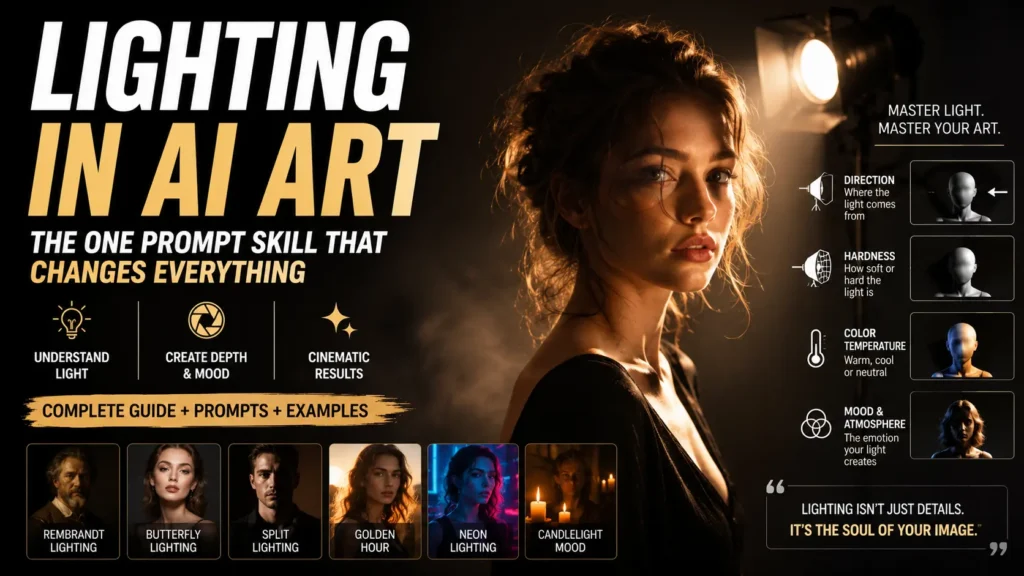
Lighting is the single most important variable in any AI-generated image, and it is also the most underused. The same prompt with different lighting instructions produces results so different that they look like they came from separate tools entirely. Once you understand how to describe light — where it comes from, what quality it has, how it interacts with your subject — you stop guessing and start directing. Your outputs become consistent. Professional. Intentional.
This guide will walk you through exactly how lighting works in AI art, which lighting types to use and when, and give you ready-to-use prompts you can drop directly into any AI image generator — ChatGPT, Gemini, Midjourney, or Ideogram — and see real results immediately.
Why Lighting Is the Most Underused Prompt Element
When most people write AI prompts, they spend their words on the subject. “A woman in a red dress standing in a forest.” The AI fills in everything else on its own — including light — and “on its own” usually means averaging across thousands of training images, which means bland, flat, uninspired results.
Professional photographers don’t think about the subject first. They think about light first. Where is it coming from? How hard or soft is it? What color temperature? What shadows does it create? The subject exists within that light, not separately from it.
AI image generators have been trained on enormous amounts of photography and cinema. They understand lighting terminology with remarkable precision. When you write “soft window light from the left,” the AI doesn’t guess — it knows exactly what that looks like because it has learned from thousands of images with that exact quality of light. The same applies to “Rembrandt lighting,” “golden hour backlight,” “neon side lighting,” and dozens of other terms.
The gap between a flat AI image and a cinematic one is usually no more than five or six words added to your prompt.
Read more:
Why Your AI Art Looks Bad and How to Fix It Like a Pro (Step-by-Step Guide)
Fashion Photography Ideas with AI
The Two Qualities That Define Any Light Source
Before you memorize specific lighting names, it helps to understand the two properties that define every light source. These are the building blocks of all lighting description.
Hardness refers to how defined the edges of shadows are. Hard light comes from small, direct sources — a bare bulb, direct sunlight, a single flash. It creates sharp, defined shadows with clear edges. Soft light comes from large or diffused sources — an overcast sky, a softbox, a window with a sheer curtain. It creates gradual, gentle shadows that blend smoothly.
Hard light is dramatic. Soft light is flattering. Neither is better — they serve different purposes.
Direction refers to where the light is coming from relative to your subject. Front lighting flattens a subject (few shadows, even illumination). Side lighting creates depth and texture (strong shadows on one side). Backlight creates silhouettes and rim effects. Top lighting creates overhead shadows that can look harsh or theatrical depending on execution.
Every lighting type you’ll read about in this guide is a combination of hardness and direction. Once you understand these two qualities, you can describe any light source you can imagine, even ones that don’t have a formal name.
Classic Lighting Techniques and How to Prompt Them
These are the lighting patterns used in professional photography and cinema. They translate directly into AI image prompts because AI models have been trained extensively on photography from these traditions.
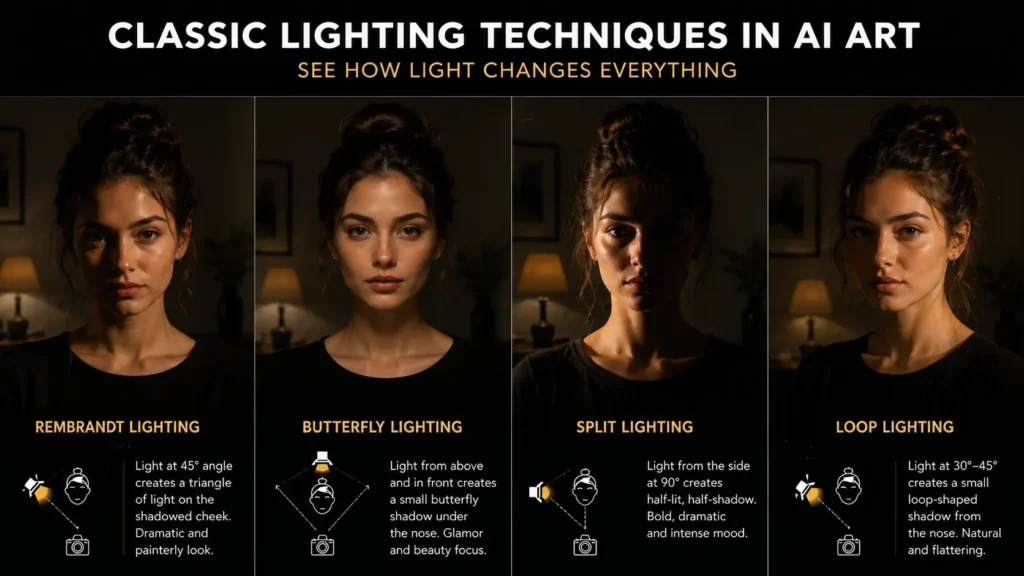
Rembrandt Lighting
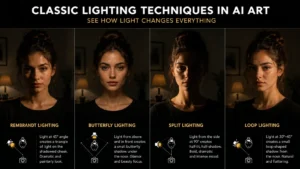
Rembrandt lighting comes from Dutch Golden Age portraiture. The key light is placed at roughly 45 degrees above and to one side of the subject, creating a small triangle of light on the shadowed cheek. The result is dramatic and intimate — one side of the face is well-lit, the other sits in deep shadow, with just that distinctive triangle catching the light.
Use it for: Portraits that feel weighty, atmospheric, or historically inspired. It works equally well for serious character art, fantasy portraits, and realistic human subjects.
Prompt to use:
Rembrandt lighting, single key light at 45 degrees upper left, triangle of light on the right cheek, deep shadows on the left side of the face, dark background, warm golden tones, painterly atmosphere
Butterfly Lighting (Paramount Lighting)
The key light is placed directly in front of and above the subject, creating a small butterfly-shaped shadow just beneath the nose. This was the standard for Hollywood studio portraits in the 1930s and 1940s — it defines cheekbones, minimizes skin texture, and creates a glamorous, clean look.
Use it for: Beauty portraits, fashion images, any subject where you want a polished, aspirational quality.
Prompt to use:
Butterfly lighting, beauty dish directly overhead and slightly forward, symmetrical shadow beneath the nose, even illumination on both cheeks, soft catchlights in the eyes, clean studio background, magazine quality
Split Lighting
The light source is placed directly to one side of the subject at 90 degrees, splitting the face exactly in half — one side in full light, the other in full shadow. It is the most dramatic of all portrait lighting techniques.
Use it for: Villains, anti-heroes, intense character portraits, thriller or noir aesthetics, any image where tension or mystery is the goal.
Prompt to use:
Split lighting, hard light source at 90 degrees from the right, exactly half the face illuminated and half in deep shadow, high contrast, black background, intense and mysterious mood, film noir aesthetic
Loop Lighting
A softer, more natural-looking technique where the key light is slightly to the side and above, creating a small shadow from the nose that loops down and to one side. It is often described as the “most natural” of the portrait lighting patterns because it closely resembles how faces look in real life with good window light.
Use it for: Casual portraits, everyday scenes, realistic people in natural settings. Wherever you want realism without heavy drama.
Prompt to use:
Loop lighting, key light slightly above and 30 degrees to the left, small nose shadow looping down toward the corner of the mouth, natural and flattering, soft quality, warm skin tones, realistic portrait photography
Rim Lighting
A light source placed behind and slightly to one side of the subject creates a bright edge around the outline of the figure — the “rim.” This separates the subject from the background with a glowing edge and is widely used in cinematic photography to give subjects visual weight and presence.
Use it for: Action shots, hero portraits, science fiction and fantasy scenes, any image where you want the subject to feel powerful or otherworldly.
Prompt to use:
Strong rim lighting from behind and slightly right, bright edge glow outlining the figure, subject in partial shadow from the front, dark background to maximize the rim effect, cinematic, dramatic presence
Natural Lighting Conditions That Work Perfectly in AI Prompts
Not all great lighting comes from studio setups. These are natural lighting conditions that AI understands deeply and renders beautifully.
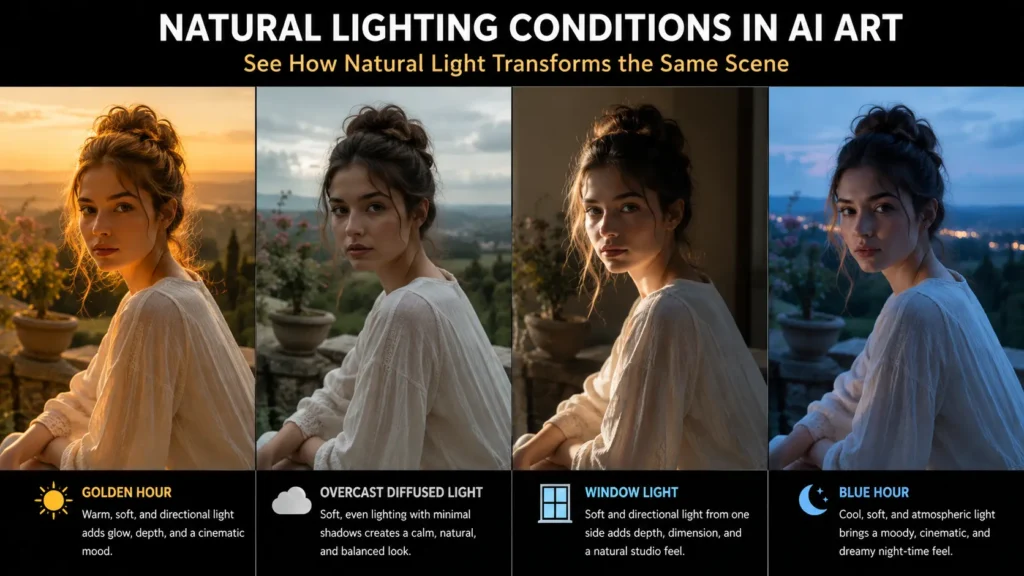
Golden Hour
The period shortly after sunrise and before sunset when the sun is low on the horizon. The light is warm (amber to golden), long-shadowed, and inherently cinematic. Almost every camera person and filmmaker considers this the most flattering natural light.
Prompt to use:
Golden hour lighting, warm amber sunlight at low angle, long soft shadows, golden glow on skin and surfaces, lens flare optional, outdoor setting, dreamy and warm atmosphere
Overcast Diffused Light
An overcast sky acts as one enormous softbox — the cloud cover diffuses the sunlight into an even, directionless, shadowless illumination. It eliminates harsh shadows and is often the best natural light for portraits that need to look real and unforced.
Prompt to use:
Overcast diffused light, even soft illumination with no harsh shadows, cool neutral tones, flat but detailed, natural outdoor environment, candid portrait quality
Window Light
A window with indirect light (not direct sunlight) is one of the most beautiful light sources for portraits — soft, directional, warm or cool depending on the time of day, and instantly recognizable as intimate and real.
Prompt to use:
Soft window light from the left, large window acting as a softbox, gentle gradient from bright side to shadow side, warm afternoon quality, indoor setting, intimate and natural, no artificial lighting
Blue Hour
The period just after sunset or just before sunrise when the sky is deep blue and the sun is below the horizon. Cooler, moodier, and more atmospheric than golden hour — excellent for urban scenes, melancholy portraits, or anything cinematic.
Prompt to use:
Blue hour lighting, deep blue sky, cool ambient light, artificial lights beginning to glow, atmospheric and moody, slight underexposure, urban or landscape setting, cinematic twilight quality
Cinematic and Creative Lighting for Stylized AI Art
These techniques go beyond photography into the visual language of film, neon-lit streets, and atmospheric digital art.
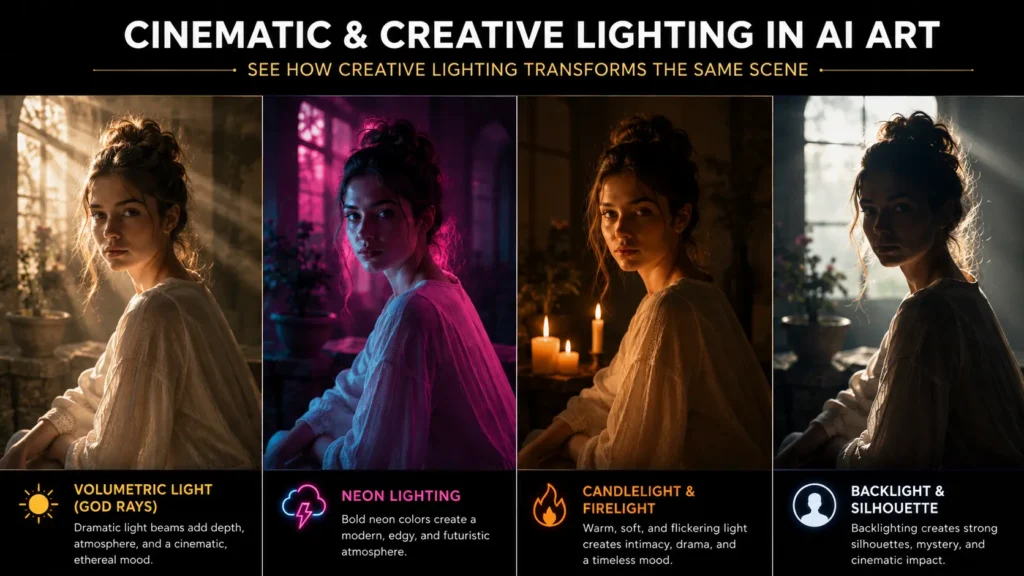
Volumetric Light (God Rays)
Volumetric light occurs when light travels through a medium — fog, smoke, dust, haze — making the light rays themselves visible. The result is what people call “god rays” — visible shafts of light falling through a scene.
Prompt to use:
Volumetric lighting, visible light rays falling through dust or fog, dramatic shaft of light from above or from one side, atmospheric haze, cinematic depth, ethereal quality
Neon Lighting
Neon creates a distinctive look — saturated color light that illuminates partly and casts colored shadows. It is the defining aesthetic of cyberpunk, night city scenes, and any AI art that wants a vibrant, urban, electric quality.
Prompt to use:
Neon lighting, pink and blue neon light sources, colored shadows, wet surfaces reflecting neon, night setting, cyberpunk atmosphere, saturated and moody
Candlelight and Firelight
These are practical light sources — meaning the light source exists within the scene itself. Warm, flickering, low-intensity, with long shadows and deep contrast between the lit and unlit areas.
Prompt to use:
Candlelight illumination, single warm flame as the only light source, face lit from slightly below and in front, deep shadows on walls and surroundings, warm orange and amber tones, intimate and atmospheric, low-key
Backlight and Silhouette
Placing the main light source behind the subject creates either a strong silhouette (if no fill light is present) or a rim effect with a glowing outline. One of the most immediately dramatic looks in all of photography.
Prompt to use:
Strong backlight, subject in silhouette against bright background, outline glow from behind, facing away from camera, dramatic and graphic, high contrast, sunset or bright window as background light source
How to Combine Lighting With Your Existing Prompts
Understanding lighting types is only half the skill. The other half is knowing how to blend lighting descriptions naturally into any prompt you are already writing.
The principle is simple: describe the light source, its direction, its quality, and its color temperature. You do not need to use all four every time, but the more you specify, the more control you have.
Here is the same base prompt with different lighting applied, so you can see exactly what changes:
Base: “A young woman sitting by a window, reading a book“
With soft window light:
A young woman sitting by a window reading a book, soft natural window light from the left, gentle shadows on the right side of her face, warm afternoon quality, candid and intimate, realistic portrait photography
With dramatic Rembrandt lighting:
A young woman sitting by a window reading a book, single key light at 45 degrees creating Rembrandt lighting, triangle of light on her right cheek, moody shadows, painterly atmosphere
With neon night lighting:
A young woman sitting by a window reading a book, neon light from outside casting pink and blue tones across her face, night setting, rain on the window reflecting the neon, cinematic and atmospheric
Three entirely different images from the same base concept — changed entirely by the lighting instruction.
Common Lighting Mistakes and How to Avoid Them
Writing “good lighting” or “nice lighting”: These are meaningless to the AI because they give no information. “Good” is subjective and untranslatable into visual terms. Replace with any specific description: “soft window light,” “golden hour,” “studio softbox.” Even a simple specific beats a vague positive.
Not specifying light direction: “Soft lighting” is better than “nice lighting,” but it still leaves direction up to the AI. Add “from the left,” “from above,” or “from behind” and you get immediately more intentional results.
Forgetting about color temperature: Light has color. Candlelight is warm orange. Overcast skies are cool blue-white. Neon is whatever color you specify. Sunsets are amber-red. Ignoring color temperature means the AI picks one for you, which is rarely what you pictured.
Over-specifying competing light sources: Beginners sometimes add multiple dramatic light sources in one prompt — golden hour and neon and candlelight all at once. Real lighting has a logic to it: there is usually one dominant source and one or two secondary fills. Ask yourself what the main light is, then add supporting light if needed.
A Reference Table: Lighting Terms for AI Prompts
Below is a quick reference for lighting vocabulary that AI image generators respond to reliably. These terms can be used individually or combined.
For soft, natural looks: Overcast diffused light · soft window light · diffused natural light · overcast sky illumination · large softbox · beauty dish · indirect daylight
For dramatic and cinematic looks: Rembrandt lighting · split lighting · hard key light · chiaroscuro · high contrast lighting · single point light source · dramatic side lighting
For warm and golden feels: Golden hour · warm amber light · sunset backlight · candlelight · firelight · tungsten warm tones · late afternoon sun
For cool and moody feels: Blue hour · moonlight · cool overcast · desaturated ambient light · fluorescent backlight · cool studio lighting
For cinematic and stylized looks: Volumetric lighting · god rays · rim lighting · backlight with lens flare · neon glow · colored gels · bioluminescent light · practical light sources
For photorealistic results: Studio three-point lighting · softbox key light with fill · Rembrandt with catch lights · window light portrait setup
A Note on Using These Prompts Across Different Tools
These lighting descriptions work because the underlying language comes from professional photography — a vocabulary that nearly all major AI image generators have been trained on extensively. Whether you are using ChatGPT’s image generation, Google Gemini, Midjourney, Ideogram, or any other tool, the terms in this article translate reliably.
One practical difference: some tools respond better to natural-language descriptions while others respond better to comma-separated keyword strings. If you are using a tool that tends toward keyword prompting (like earlier versions of Midjourney), pull the key phrases from each prompt above. If you are using a conversational tool (like ChatGPT or Gemini), the full descriptive sentences work well as written.
When a prompt does not produce the result you expected, lighting is always the first place to revisit. Adjust the direction, change the quality from soft to hard or vice versa, or shift the color temperature — often a single lighting adjustment resolves the entire image.
What You Now Know
Lighting is not a finishing touch you add to a prompt. It is the foundation that every other element in the image depends on. A brilliant character in an interesting environment with flat, unspecified lighting looks amateurish. That same character and environment under a considered light — even a simple “soft window light from the left” — looks professional.
You do not need to use every technique in this guide at once. Start with one. Add direction to your next prompt. Then add quality. Then color temperature. Within a few generations you will see a difference you cannot unsee, and you will never write a lighting-free prompt again.
The tools have always been capable of producing this quality. The prompts are the part you control.
FAQs
1. What is the best lighting prompt for AI-generated images?
The best lighting prompts are specific about three things: the light source, its direction, and its quality. Rather than writing “good lighting,” use phrases like “soft window light from the left,” “Rembrandt lighting with a key light at 45 degrees,” or “golden hour backlight with warm amber tones.” These give the AI concrete visual instructions instead of leaving it to guess, which almost always results in flat, generic output.
2. Why do my AI images look flat even when I describe the scene in detail?
Flat AI images are almost always a lighting problem, not a subject problem. When lighting is not specified in a prompt, AI generators default to neutral, even illumination across the scene — which removes depth, shadow, and mood. Adding a single lighting instruction (even just “soft side lighting from the left”) introduces direction and contrast that immediately makes an image feel three-dimensional and intentional.
3. How does lighting affect the mood of AI-generated images?
Lighting controls mood more than any other element in an image. Warm, low-angle light creates intimacy and nostalgia. Hard side lighting creates tension and drama. Soft window light creates calm and realism. Cool blue light creates distance or melancholy. Neon lighting creates energy and edge. The subject stays the same — only the light changes — but the emotional reading of the image changes completely. This is why specifying lighting in your prompt is the fastest way to control the overall feel of your output.
4. What is Rembrandt lighting and how do I use it in AI art?
Rembrandt lighting is a portrait technique from Dutch Golden Age painting where a single key light is placed at roughly 45 degrees above and to one side of the subject, creating a small triangle of light on the shadowed cheek. It produces dramatic, atmospheric portraits with strong contrast and depth. To use it in AI art, add “Rembrandt lighting, key light at 45 degrees upper left, triangle of light on the cheek, deep shadows on the opposite side” to your prompt. It works in any AI image generator that has been trained on photography.
5. Can I use the same lighting prompts across different AI image generators?
Yes. Lighting terminology comes from professional photography — a vocabulary that nearly all major AI image generators (ChatGPT, Gemini, Midjourney, Ideogram, and others) have been trained on extensively. Terms like golden hour, volumetric lighting, soft diffused light, rim lighting, and split lighting translate reliably across tools because they describe real, photographically documented lighting conditions. The main difference is that some tools prefer comma-separated keywords while others respond better to full descriptive sentences — but the core lighting vocabulary stays the same.