Common Mistakes and Advanced Techniques to Fix AI Image Quality
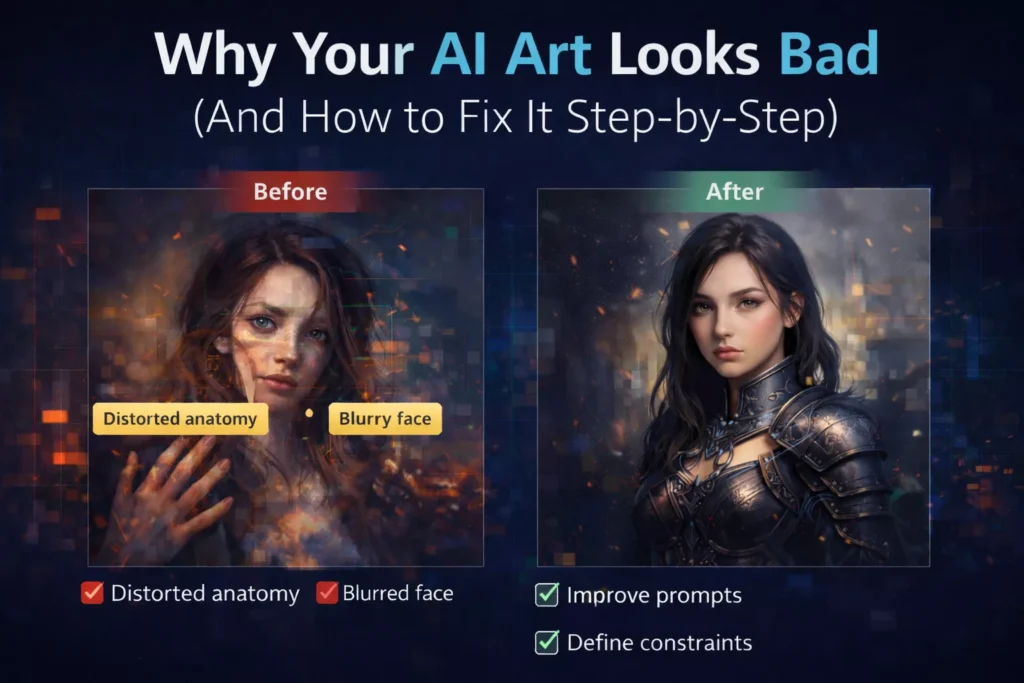
AI image generation has reached a point where producing visually impressive outputs is no longer rare. Yet, for a large number of users, results remain inconsistent—sometimes even unusable. Faces appear distorted, compositions feel incoherent, and the generated image often fails to reflect the original idea.
What makes this particularly frustrating is that these failures occur even when prompts seem “detailed enough.”
The underlying issue is not randomness or model limitation in isolation. It is a mismatch between how users describe images and how generative models interpret those descriptions.
Understanding the Core Problem: Misaligned Communication with the Model
At a technical level, models such as Stable Diffusion and Midjourney do not process prompts as language in the human sense. They translate text into mathematical representations—vectors in a latent space—where each token influences the probability distribution of visual features.
This means that a prompt is not interpreted as a coherent instruction. It is processed as a collection of weighted signals.
When those signals are:
- ambiguous,
- incomplete, or
- internally conflicting,
the model does not “ask for clarification.” It resolves uncertainty by averaging patterns from its training data. The result is what users often describe as “bad AI art”—images that are technically generated, but visually unsatisfying or incorrect.
To fix this, we need to understand where these signal failures occur.
Where AI Image Generation Breaks Down
1. Semantic Underspecification
One of the most common causes of poor output is the absence of precise semantic direction.
A prompt like “a beautiful portrait” appears descriptive, but from the model’s perspective, it is highly underdefined. Terms such as “beautiful” are not objective—they map to a wide distribution of visual possibilities. Without constraints, the model defaults to statistically common patterns, which results in generic or inconsistent imagery.
What appears to be a “lack of quality” is, in reality, a lack of instructional clarity.
A more effective prompt narrows the semantic range:
a close-up portrait of a middle-aged woman, natural skin texture, soft window lighting, neutral background, 85mm lens, shallow depth of field
Here, the model is no longer guessing. It is executing within defined boundaries.
2. Latent Space Conflict
Another major failure point arises when prompts combine elements that do not coexist naturally in the model’s learned representations.
For example:
anime style, photorealistic, oil painting
Each of these styles occupies a different region in latent space. When combined without hierarchy, they compete rather than cooperate. The model attempts to reconcile incompatible features, often producing visual artifacts, texture inconsistencies, or stylistic ambiguity.
This is not a stylistic issue—it is a mathematical conflict.
Effective prompting avoids this by establishing a dominant style and, if necessary, introducing secondary modifiers with restraint.
3. Absence of Structural and Compositional Guidance
Unlike a human artist, an AI model does not inherently understand scene composition unless explicitly directed.
If a prompt lacks spatial instructions, the model distributes elements based on probability rather than intention. This leads to:
- poorly framed subjects
- cluttered scenes
- incorrect proportions
Composition must be specified as part of the prompt’s structure, not assumed as a default capability.
4. Lighting as a Determinant of Realism
Lighting is one of the most underutilized yet critical components of prompting.
In photography and visual design, lighting defines depth, mood, and realism. The same principle applies to AI-generated imagery. Without clear lighting conditions, the model produces flat and visually unconvincing outputs.
This is because lighting cues help the model resolve spatial relationships and material properties. When those cues are missing, the result lacks dimensionality.
5. The Role of Negative Constraints
Perhaps the most misunderstood aspect of AI prompting is the absence of constraints.
Diffusion models generate images by progressively refining noise. In doing so, they attempt to complete patterns—even when those patterns are undesirable. This is why issues such as extra fingers, distorted anatomy, or background artifacts are so common.
These are not “errors” in the traditional sense. They are unconstrained predictions.
By explicitly excluding unwanted features, you reduce their probability in the generation process. This is not a minor adjustment—it is a fundamental control mechanism.
👉 Negative Prompts in AI Art Explained (With Examples)
A Practical Framework for Fixing Poor AI Outputs
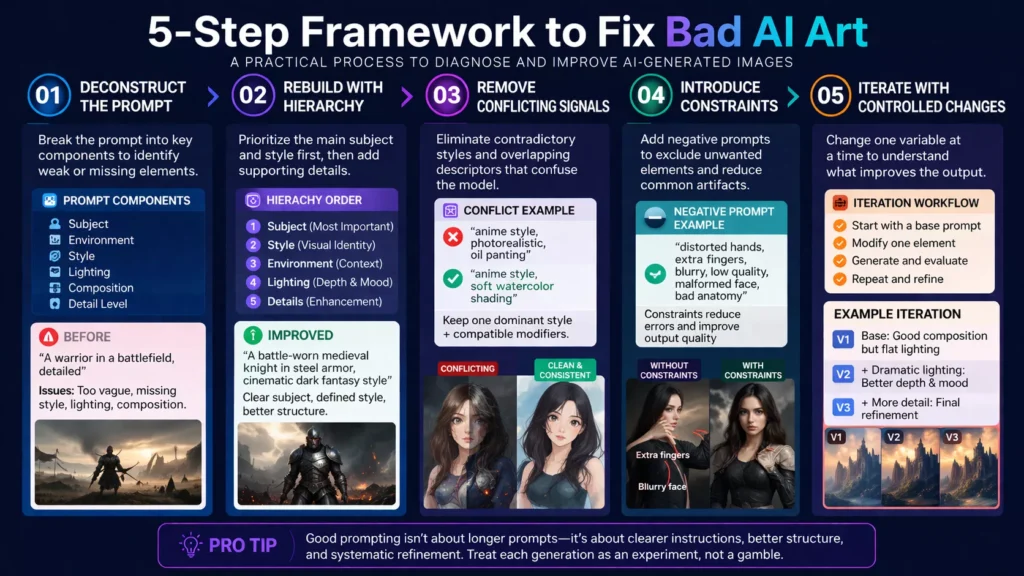
Understanding why AI-generated images fail is only useful if it leads to a repeatable correction process. Most users remain stuck because they treat every failed output as a new attempt rather than a diagnosable system error.
The framework below is designed to move from uncertain trial-and-error to controlled, iterative refinement, where each change produces a measurable improvement.
Step 1: Deconstruct the Prompt into Functional Components
When an output looks incorrect, the instinct is often to rewrite the entire prompt. This approach usually makes things worse because it introduces new variables instead of identifying the root problem.
A more effective method is to break the prompt into its functional layers:
- Subject → What is the main focus?
- Environment → Where does it exist?
- Style → How should it look visually?
- Lighting → How is the scene illuminated?
- Composition → How is the subject framed?
- Detail Level → How much visual fidelity is required?
Each of these components influences a different part of the model’s generation process.
Why this matters technically
In diffusion models, different parts of your prompt activate different regions of latent space. If one component is weak or missing, the model compensates using default patterns from its training data—often leading to generic or incorrect outputs.
Practical Example
Original Prompt:
A warrior in a battlefield, detailed
At first glance, this seems acceptable. But after decomposition:
- Subject → “warrior” (too generic)
- Environment → “battlefield” (undefined)
- Style → missing
- Lighting → missing
- Composition → missing
- Detail → vague (“detailed”)
The problem is not the AI—it’s the absence of structured instruction.
Step 2: Rebuild the Prompt with Hierarchical Control
Once the prompt is decomposed, the next step is not simply adding more detail—it is organizing that detail correctly.
AI models do not treat all tokens equally. Earlier and clearer tokens tend to have stronger influence, especially when combined with descriptive clarity.
Hierarchy Principle
A well-structured prompt should follow a natural priority:
- Primary Subject (highest importance)
- Core Style (defines visual identity)
- Environment (contextual grounding)
- Lighting (depth and realism)
- Secondary details (enhancement, not dominance)
Rebuilt Prompt Example
A battle-worn medieval knight in steel armor, standing in a smoky battlefield, cinematic dark fantasy style, dramatic backlighting, embers in the air, shallow depth of field, highly detailed textures
What changed
- The subject is now specific and visually grounded
- Style is clearly defined and dominant
- Environment supports the subject instead of competing with it
- Lighting adds depth and realism
This is not just “more detail”—this is controlled instruction sequencing.
Step 3: Identify and Remove Conflicting Signals
One of the most subtle but damaging issues in prompting is internal contradiction.
Many users unintentionally combine elements that cannot logically coexist in the model’s learned representations.
Example of Conflict
Realistic, anime style, watercolor painting, ultra photorealistic
From a human perspective, this might seem like “more creative direction.”
From a model’s perspective, it is competing instructions across different visual domains.
What happens internally
The model attempts to resolve this conflict by blending incompatible features. The result is often:
- muddy textures
- inconsistent rendering
- visual artifacts
How to fix it
Instead of stacking styles, define:
- one dominant style
- optional minor modifiers (if compatible)
Corrected Approach
Anime style, soft watercolor shading
Now the styles are aligned rather than competing.
Step 4: Introduce Constraints to Reduce Model Error
Even a well-structured prompt can fail if it does not include constraints.
This is because ai models are designed to complete patterns probabilistically. When uncertainty exists—especially in complex areas like hands, faces, or background elements—the model generates what is most statistically likely, not necessarily what is correct.
Why constraints are critical
Without constraints:
- Unwanted features are not suppressed
- Errors accumulate in fine details
- Visual coherence degrades
Types of Common Failures
- Anatomical errors (hands, eyes, limbs)
- Texture noise
- Background artifacts
- Low-resolution outputs
Constraint-Based Fix
Instead of hoping the model avoids these issues, you explicitly reduce their probability:
Distorted hands, extra fingers, blurry, low quality, malformed face, bad anatomy
Technical Insight
Negative prompts act as probability suppressors. They don’t “delete” elements—they reduce the likelihood of those features appearing during the denoising process.
This is one of the most powerful yet underutilized controls in AI image generation.
👉 Negative Prompts in AI Art Explained (With Examples)
Step 5: Iterate with Controlled Variable Isolation
The final step is where most users fail—not because they lack knowledge, but because they lack methodology.
Instead of making targeted adjustments, they rewrite the entire prompt repeatedly. This creates inconsistent results because multiple variables change at once.
Professional Approach: Controlled Iteration
Treat each generation as an experiment:
- Change only one parameter at a time
- Observe how the output responds
- Retain improvements, discard regressions
Example Workflow
- Base prompt → evaluate subject clarity
- Adjust lighting → observe depth changes
- Add constraints → check artifact reduction
- Modify style → refine visual identity
This approach allows you to map cause → effect relationships, which is essential for consistent results.
Conclusion
The perception that “AI art looks bad” is often a reflection of how the system is being used, not a limitation of the system itself.
Generative models are highly responsive to input quality. When prompts are unclear, conflicting, or unconstrained, outputs degrade accordingly. When prompts are structured, precise, and technically aligned with how models interpret information, the results improve significantly.
The goal is not to write longer prompts, but to design better ones—prompts that function as clear, structured instructions rather than descriptive guesses.
In that sense, effective prompting is less about artistic intuition and more about communication with a probabilistic system.
FAQs
1. Why do AI images look weird?
Negative prompts are instructions that tell an AI model what eAI images look weird when prompts are vague or unclear. The model predicts visuals based on probability, not understanding, which can cause distorted faces, extra fingers, or inconsistent details. Using structured prompts and adding negative prompts helps improve accuracy.
2. Why does AI art fail so often?
AI art fails when prompts lack structure or contain conflicting instructions. Missing details like lighting, style, or composition can confuse the model. Clear, focused prompts and step-by-step refinement significantly improve results.
3. How can I improve the quality of AI-generated images?
Use a structured prompt with subject, style, lighting, and composition. Avoid mixing styles, add clear details, and include negative prompts to remove errors. Refining prompts step-by-step also helps achieve better results.
4. What are the most common mistakes in AI art prompts?
Common mistakes include vague descriptions, conflicting styles, ignoring lighting, and not using negative prompts. Overloading prompts with random keywords can also reduce quality instead of improving it.
5. Why are AI-generated hands and faces often distorted?
Hands and faces are complex, and AI models often misinterpret them. This leads to extra fingers or distorted features. Adding detailed descriptions and negative prompts like “bad anatomy” helps reduce these errors.