A complete guide to negative prompts in AI art—learn how to improve image quality, fix distortions, and gain better control.
AI image generation has made it possible to create highly detailed visuals from simple text prompts. However, one persistent limitation continues to affect both beginners and experienced users: a lack of precise control over the output.
Even with well-written prompts, generated images often contain issues such as distorted anatomy, unwanted objects, inconsistent styles, or low-detail areas. These problems are not random—they are a direct result of how AI models interpret and generate visual data.
A common mistake is trying to fix these issues by simply adding more descriptive detail to the prompt. While this can sometimes help, it does not prevent the model from introducing unwanted elements.
The more effective approach is to control both sides of the generation process:
not only defining what should appear in the image, but also clearly specifying what should be excluded.
This is the role of negative prompts in AI art. When used correctly, they allow you to significantly improve image quality, reduce common errors, and produce more consistent results.
What Are Negative Prompts in AI Art?
Negative prompts are instructions that tell an AI model which elements should not be included in the generated image.
In practical usage, AI image generation relies on two complementary inputs:
- A positive prompt, which describes the desired subject, style, and composition
- A negative prompt, which filters out unwanted features
This dual structure allows for more controlled and predictable outputs.
Example
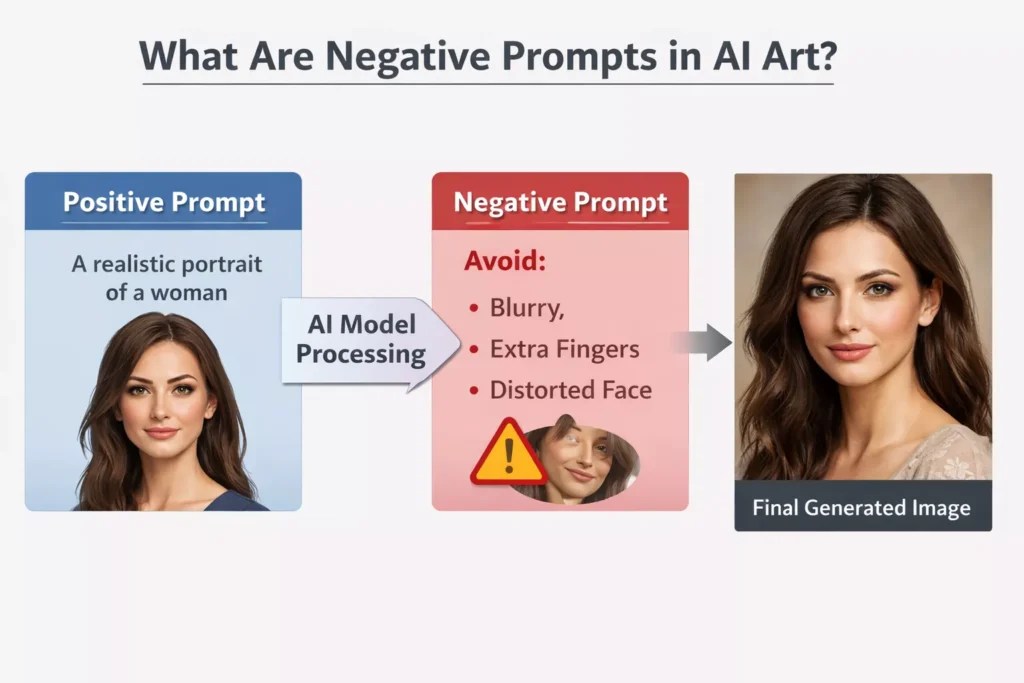
Positive Prompt:
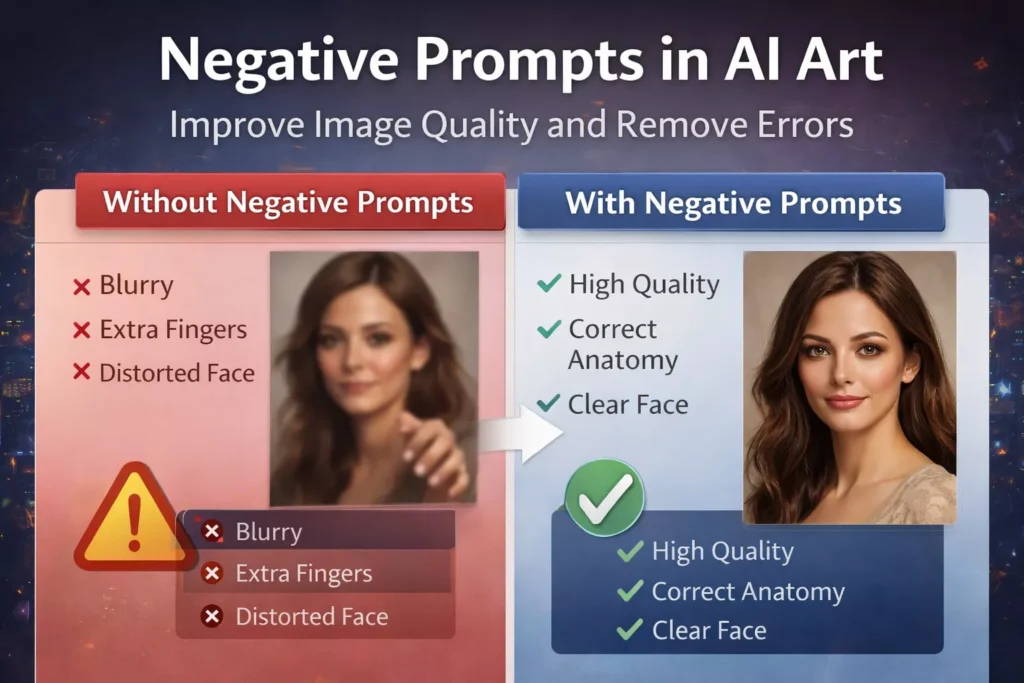
“A realistic portrait of a woman, natural lighting, high detail”Negative Prompt:
“blurry, low quality, extra fingers, distorted face”
In this example, the positive prompt defines the goal, while the negative prompt reduces the likelihood of common errors. The result is typically a cleaner and more refined image.
How Negative AI Prompts Work (Technical Explanation)
To understand why negative prompts are effective, it’s important to briefly examine how diffusion-based AI models generate images.
These models begin with random noise and gradually refine it into a structured image over multiple steps. At each step, the model predicts how the image should evolve based on the input text.
- The positive prompt increases the probability of certain visual features
- The negative prompt decreases the probability of others
This works because the model has learned associations between words and visual patterns from large datasets. However, these datasets include both high-quality and flawed images.
As a result, the model may naturally reproduce issues such as:
- Unrealistic anatomy
- Soft or blurry textures
- Unwanted visual artifacts
Negative prompts act as a probability filter, reducing the influence of these undesirable patterns during generation. Instead of allowing the model to freely choose from all learned patterns, you are narrowing its options to more relevant and higher-quality outcomes.
Why Negative Prompts Are Essential for High-Quality Outputs
Without negative prompts, the AI operates with a broader range of possible outputs, which often leads to inconsistency.
Example
When generating a portrait without constraints, the model might produce:
- Slightly asymmetrical facial features
- Unnatural hand structures
- Inconsistent lighting across the image
By applying negative prompts, you actively reduce these risks.
Practical Impact
Using negative prompts leads to:
- Sharper and more detailed images
- Fewer anatomical errors
- Cleaner backgrounds
- More consistent style and lighting
This reduces the need for repeated regeneration or external editing, making the entire workflow more efficient.
Types of Negative Prompts (With Practical Application and Context)
Understanding negative prompts becomes far more effective when you treat them as functional controls, not just keyword lists. Instead of randomly adding exclusions, each category should be used with a clear purpose based on the type of image you are generating.
1. Quality Suppression and Detail Control
One of the most common issues in AI-generated images is inconsistent detail—where some areas appear sharp while others remain soft or poorly defined.
Negative prompts in this category are used to reduce low-fidelity patterns that originate from compressed or low-resolution training data. Terms like “blurry,” “pixelated,” or “compression artifacts” do not directly “add sharpness,” but they reduce the model’s tendency to settle on lower-detail outputs.
Practical Insight:
This category is particularly effective when generating images at standard resolutions (e.g., 512×512 or 768×768), where the model is more likely to compromise on detail. It helps maintain consistency across the entire image rather than improving only specific regions.
2. Anatomical and Structural Correction
Diffusion models are statistically good at recognizing human forms but not always accurate in reconstructing them. This is why errors such as extra fingers, fused limbs, or asymmetrical facial features are common.
Negative prompts targeting anatomy act as structural constraints, reducing the probability of these distortions during generation.
Practical Insight:
These prompts are preventative. They are most effective when applied from the beginning, rather than after multiple failed generations. For portrait or character-based work, this category is essential for achieving professional-quality outputs.
3. Style Isolation and Consistency Control
AI models are trained on diverse datasets that include photography, digital art, paintings, and illustrations. Without clear constraints, the model may blend multiple styles into a single output.
Negative prompts in this category are used to eliminate competing visual styles, allowing the model to focus on a single, coherent aesthetic.
Practical Insight:
This becomes especially important when working on commercial or brand-specific visuals, where consistency is critical. For example, when aiming for photorealism, excluding stylized elements prevents subtle inconsistencies that can make the image feel artificial.
4. Artifact and Unwanted Element Removal
AI-generated images often include unintended elements such as random text, watermark-like patterns, or cluttered backgrounds. These are not always obvious in prompts but emerge from dataset biases.
Negative prompts here function as content filters, helping remove elements that reduce the usability of the image.
Practical Insight:
This category is particularly valuable when creating images for professional use—such as marketing, thumbnails, or client work—where even small artifacts can affect credibility.
5. Lighting and Exposure Regulation
Lighting plays a critical role in perceived realism. Poor lighting often results in flat, unrealistic, or overly harsh images.
Negative prompts related to lighting help the model avoid imbalanced exposure conditions, such as overexposure or underexposure, which can degrade image quality.
Practical Insight:
Rather than relying only on positive lighting descriptions, combining them with negative constraints creates more balanced and controlled results, especially in complex scenes.
A Structured Workflow for Using Negative Prompts Effectively
Using negative prompts effectively requires a deliberate process rather than guesswork. A structured workflow not only improves output quality but also reduces unnecessary iterations.
Step 1: Define a Precise Visual Objective
Before generating an image, clearly establish what you want in terms of subject, style, and composition. A vague prompt leads to unpredictable outputs, making negative prompts less effective.
A well-defined objective ensures that negative prompts act as refinements rather than corrections.
Step 2: Apply Foundational Constraints
Introduce a small, high-impact set of negative prompts that target the most common failure patterns—such as low quality, blur, and anatomical inconsistencies.
This creates a stable baseline and prevents obvious issues from appearing in the initial output.
Step 3: Generate and Critically Evaluate
After generating the image, take time to evaluate it carefully instead of regenerating immediately. Look beyond surface-level appearance and identify structural or stylistic flaws.
This step is crucial because effective refinement depends on accurate diagnosis.
Step 4: Isolate and Address Specific Problems
Rather than adding multiple new terms at once, focus on the most prominent issue in the image—whether it is related to anatomy, lighting, or unwanted elements.
Targeted adjustments are significantly more effective than broad changes.
Common Mistakes That Reduce the Effectiveness of Negative Prompts
Despite their usefulness, negative prompts are often misused in ways that limit their impact or even degrade image quality.
1. Overloading the Prompt with Excessive Keywords
A frequent mistake is using long, copy-pasted lists of negative prompts without understanding their purpose. While this may seem like a way to “cover all problems,” it often introduces conflicting constraints.
This can confuse the model and result in weaker or less coherent outputs.
2. Using Generic or Irrelevant Terms
Not all negative prompts are universally applicable. Adding unrelated exclusions can interfere with the generation process and reduce accuracy.
Effective negative prompting depends on relevance, not quantity.
3. Relying on Negative Prompts Without Strengthening the Main Prompt
Negative prompts are designed to refine outputs, not define them. If the primary prompt lacks clarity, negative prompts alone cannot produce high-quality results.
A balanced approach—strong positive prompt combined with targeted negative constraints—is essential.
4. Ignoring Model-Specific Behavior
Different AI models respond differently to prompts. A negative prompt that works well in one model may not produce the same results in another.
Understanding the behavior of your specific tool is important for consistent performance.not to give the AI more freedom, but to guide it within clearly defined boundaries.
Takeaways
Negative prompts are a fundamental part of modern AI image generation. They provide a level of control that cannot be achieved through positive prompts alone.
Frequently Asked Questions (FAQs)
1. What are negative prompts in AI art?
Negative prompts are instructions that tell an AI model what elements to avoid in an image, helping improve accuracy and reduce unwanted artifacts.
2. How do negative prompts improve AI image quality?
They reduce the likelihood of common issues such as blur, distortion, and unwanted objects by filtering out undesirable patterns.
3. What are the best negative prompts for beginners?
Common starting points include terms like blurry, low quality, extra fingers, and bad anatomy.
4. Can negative prompts fix distorted faces and hands?
They can significantly reduce these issues when used alongside a well-structured primary prompt.
5. Are negative prompts necessary for high-quality AI art?
Yes, especially when generating realistic or professional-grade images where precision is important.